D2L makes updates to Brightspace on a monthly basis. Taylor University's updates are usually available the 24th of the month. To access the complete D2L release notes for March 2026, sign into the D2L Brightspace Community and click on this link: March 2026/20.26.03 - Brightspace. Taylor University does not implement all new updates.
Classlist – export Classlist details to CSV and improved Print output | New
Instructors can now export Classlist details to CSV. The Export button enables full or partial user exports, mirroring Classlist view content for offline or administrative use.
Printed Classlists now include pronouns (if visible) and course identifiers, providing more complete context for in-person workflows and record keeping.
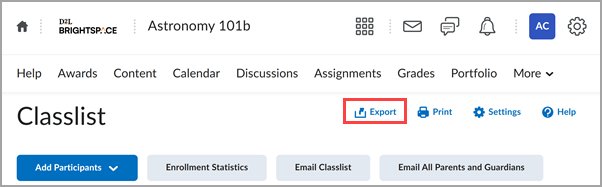
Figure: A new Export button appears on the Classlist page.
To allow for more control over access, this update includes two new permissions that control visibility of the Print and Export buttons in the Classlist:
- Classlist > Can Print Classlist (enabled by default for users who have the Classlist > Has Access to the Classlist permission enabled)
- Classlist > Can Export Classlist (disabled by default)
Pulse – Engagement tracking improvements | Updated
This release improves the reliability, timeliness, and consistency of engagement tracking from Pulse. This enhancement ensures that engagement data more accurately reflects how learners are interacting with their courses across platforms.
Engagement related events in Pulse are now logged immediately. For example, when a learner taps on a course to open it, the Course Access details are sent to the database, the Last Accessed date in Classlist updates, and an Intelligent Agent that checks for course engagement knows not to notify the instructor. Downstream tools that report on learner engagement now represent both Web and Pulse activity equally.
Previously, Pulse events were sent asynchronously in batches, resulting in missing or late engagement tracking data and discrepancies between different tools.
Key improvements:
- System Access Start events are sent immediately when the app is launched.
- System Access Start events are decoupled from System Access End events.
- When the app is in the background or idle, System Access End events are sent after 30 minutes of inactivity.
- Course Access events are sent immediately when a user clicks into a course.
For more detailed definitions of engagement metrics, refer to About engagement and session length data.
 |
Notes:
Intelligent Agents
- Intelligent Agents are configured to use Login Activity criteria trigger based on authentication data. Refer to User Logins BDS for more information.
- Intelligent Agents configured to use the Course Activity criteria trigger are based on combined course access data from Brightspace as well as Pulse. Refer to Course Access BDS and Course Access Log BDS for more information.
- Missed or delayed triggers caused by late arriving events are now resolved as Pulse activity is sent immediately.
Classlist “Last Accessed”
- Classlist > Last Accessed displays the most recent date/time a user accessed the course either via Brightspace or Pulse.
- Teachers can easily confirm whether a student accessed the class, regardless of device.
Class Progress Course Access
|