D2L makes updates to Brightspace on a monthly basis. Taylor University's updates are usually available the 24th of the month. To access the complete D2L release notes for October 2025, sign into the D2L Brightspace Community and click on this link: November 2025/20.25.11 - Brightspace. Taylor University does not implement all new updates.
In response to multiple Product Idea Exchange (PIE) submissions, when Instructors create a new announcement in a Course Offering, they can now choose to send a copy to all users in their Classlist as an email, sent as if from the instructor themselves.
In the user interface for creating or editing an announcement, a new Send Email Copy checkbox now appears when an instructor creates or edits an announcement.
When an instructor selects the new checkbox, the system emails the content of the announcement to all users in the Classlist on publishing.
Users who are not subscribed to receive a notification for announcements will also receive an email, ensuring that important information contained within the announcement is delivered to every learner.
For consistency with automated emails in Intelligent Agents and assignment submissions, the system sends the message to internal email addresses if users have them. If users do not have internal email addresses, the system sends it to their external email address.
Users without a valid email address will not receive an emailed copy of the announcement.
For announcements scheduled to publish at a later date, clicking the Send Email Copy checkbox emails the copy to users in the Classlist at the time that the announcement is published.
Assignments – Advanced Assessment now shows when an evaluation has no designated evaluator | Updated
A new alert in the assignments user interface now notifies instructors when an evaluation currently has no evaluator assigned, so they can quickly identify the problem and take steps to assign a new evaluator.
This update helps prevent unexpected evaluation errors and improves clarity, especially for institutions with large enrollments and multiple sections.
Previously, if an instructor used Advanced Assessment features to delegate evaluation to a user who later became unenrolled from a course, there was no way to identify which submissions needed to be assigned a new evaluator. Learner submissions could remain unevaluated for extended periods of time, causing confusion and errors.
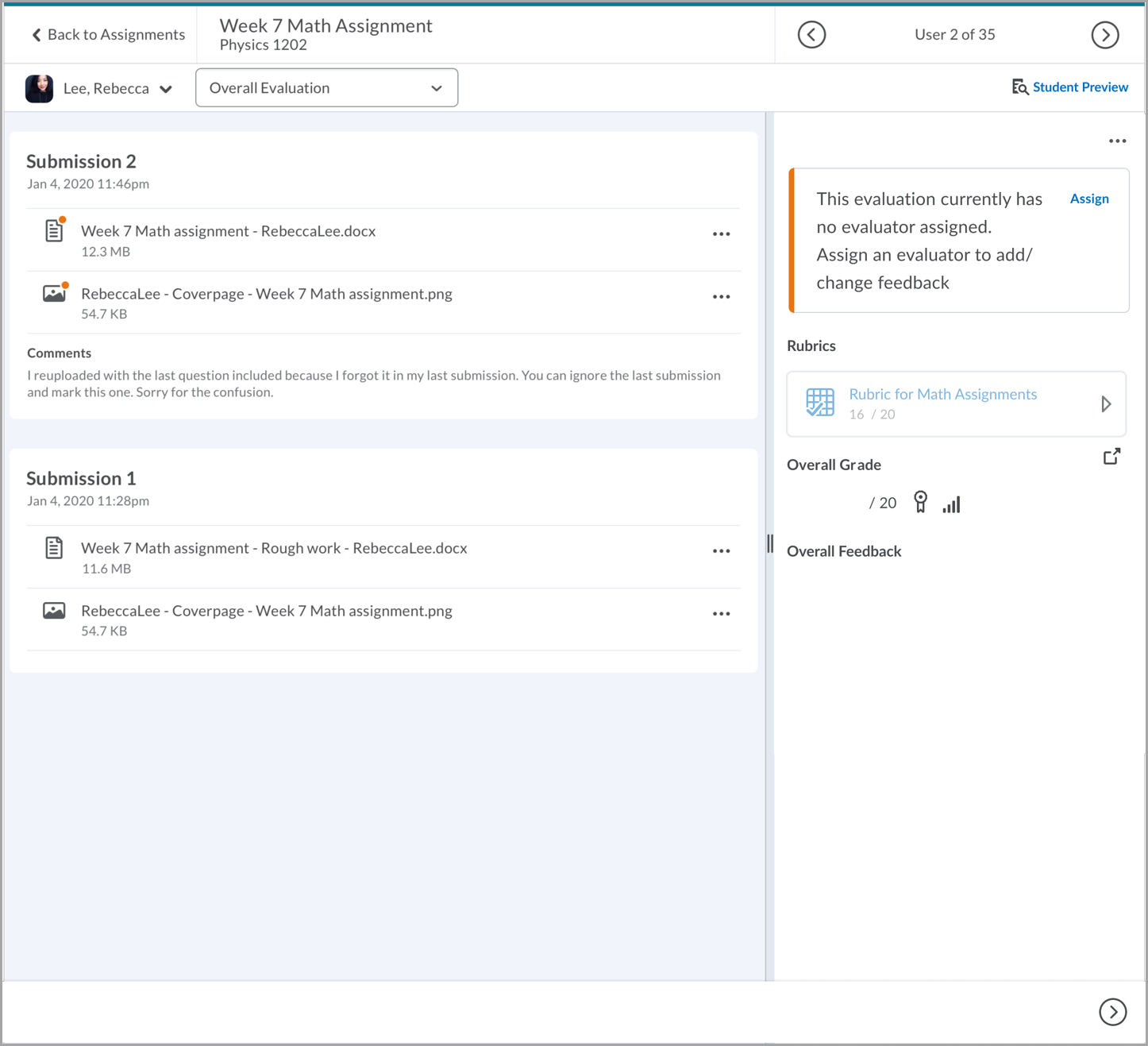
Figure: An example of a warning message when an assignment has no assigned evaluator.
Brightspace – Progress bar for uploading files | New
With this release, Brightspace improves visual consistency and accessibility by updating progress bar indicators across several tools. These improvements enhance support for screen readers and assistive technologies.
Visual indicators have been updated in the following areas:
- New Content Experience – Upload a file
- Quizzes – Add Existing Question
- Import Quiz Questions – Upload a file
- Quiz Study Support – Check if the quiz meets the study support requirements
- Generate Question – Choose a file to generate a question
- Content Uploader – Upload a file
- Manage Groups – Export progress bar
- Upload File (Classic Content) – Upload a file
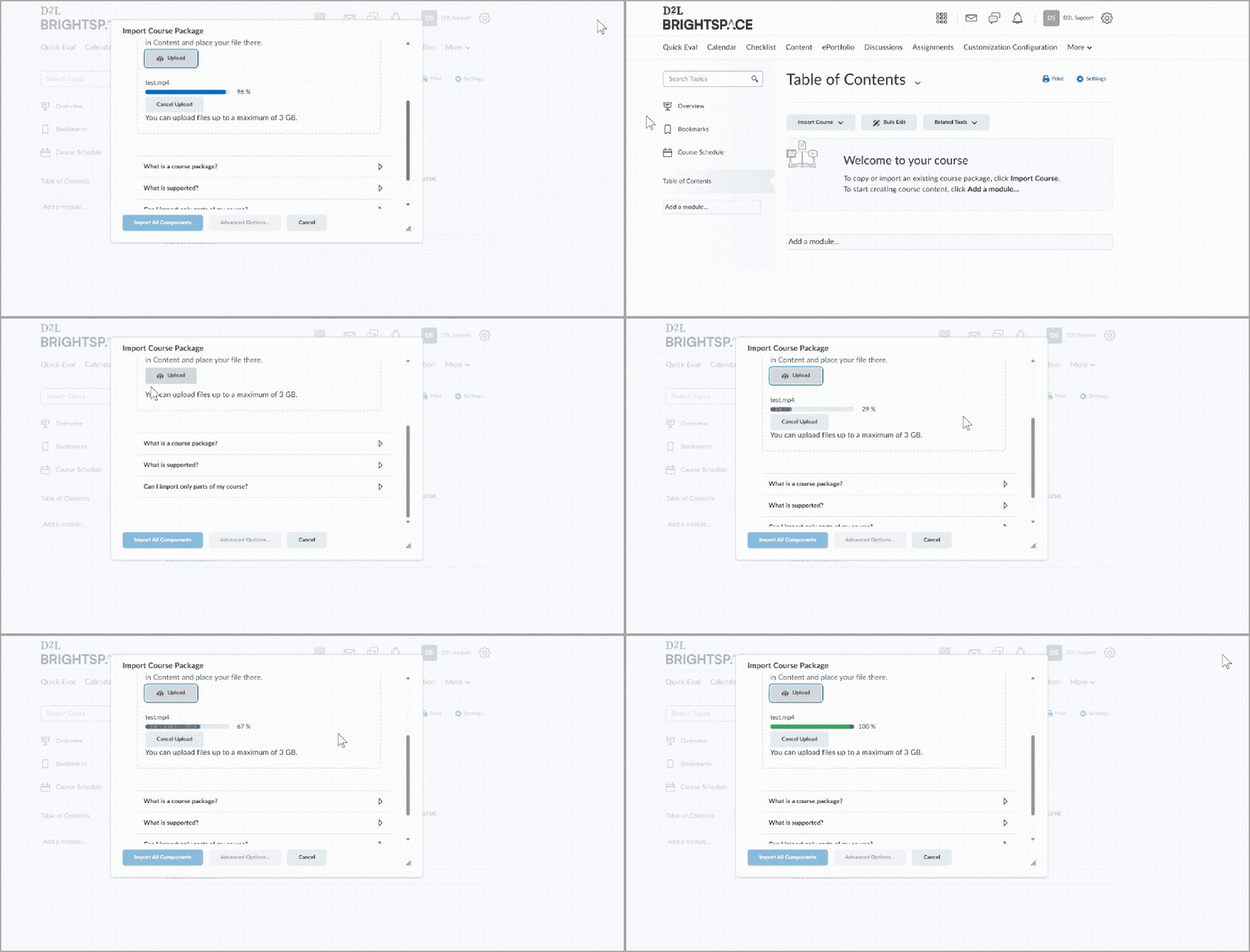
Figure: An example of the progress bar updating as a user adds a module to the Table of Contents in D2L Brightspace, indicating the step-by-step progress.
Brightspace Editor – Equation editor now uses the latest WIRIS version | Updated
The equation editor Instructors and Learners use to compose equations in the Brightspace Editor (WIRIS) has been updated to the latest version, 7.24.0.
This update includes no functional changes to the equation editor, but does include WIRIS defect fixes.
Instructors can now use the Exclude from Final column when bulk editing grade items in the Grades tool. Selecting this option excludes the grade item from the final grade calculation.
Previously, this setting was only available when editing individual grade items. This enhancement helps instructors manage large grade books more efficiently by allowing them to update multiple items at once.
 |
Note: This option is only available in courses using the Points grading system. Courses using Weighted or Formula grading systems can exclude items by assigning a weight of 0 or excluding them from the formula, respectively. |
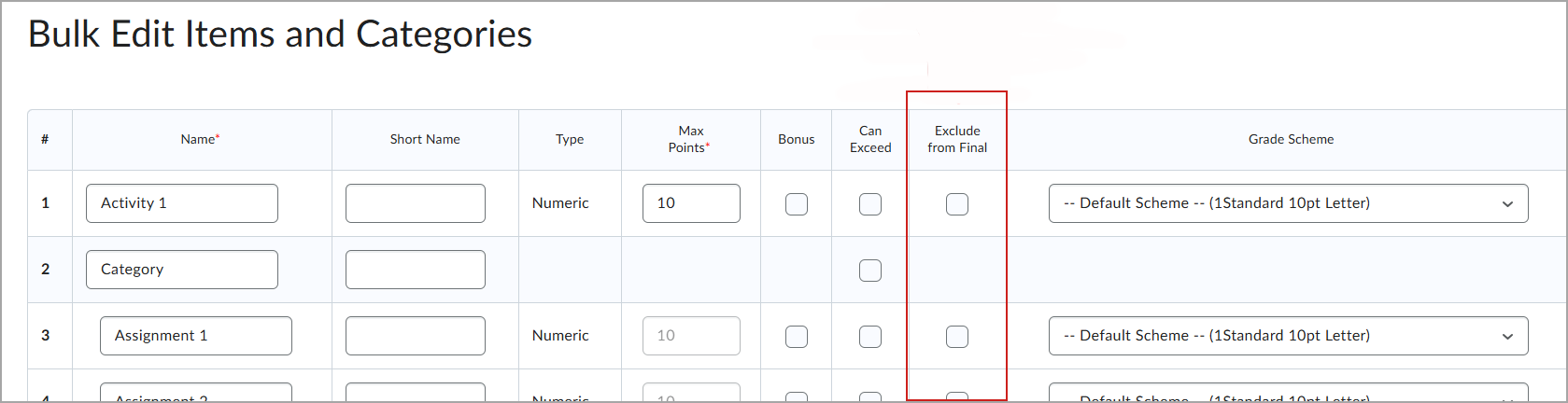
Figure: In the Bulk Edit Items and Categories page, select Exclude from Final for each item to omit from the final grade.
Learning Outcomes – Enable Supporting of Multiple Outcome Sets | Updated
Outcomes are now clearly grouped by Outcome Set across Brightspace, including in the Course Outcomes list, release condition dropdowns, and other relevant areas. This improved organization makes it easier for users to navigate, differentiate, and understand outcomes within a course.
With this update, each Outcome Set is displayed as a distinct group, enhancing clarity and laying the groundwork for future Outcome Set features.
Previously, outcomes were listed in the order they were added, which could lead to confusion and repetition of Outcome Set names.
Additionally, this release has added the following improvements to outcomes:
- Renamed lower-level outcomes to sub-outcomes for clearer terminology and improved consistency across the platform.
- Added warning messages when deleting outcomes from individual management:
- Warning when outcome is linked to deleted activities. If an outcome is associated with a deleted activity (such as an assignment, discussion, or quiz) and a user attempts to delete it, a pop-up message warns the user that the outcome may still have assessments linked to it.
- Confirmation when no assessments are linked. If no assessments are associated with the outcome, a message appears asking the user to confirm the deletion.